Best alternative to Acunetix, meet Jikida.
Acunetix is a strong enterprise DAST scanner built for dedicated security teams. Jikida adds a graded live-app pentest, repo and dependency scanning, uptime, and a managed WAF in one developer-priced account with a free tier.
Why teams pick Jikida over Acunetix.
Acunetix, now part of Invicti, is a mature enterprise DAST scanner. It crawls a web application and reports vulnerabilities like injection flaws, cross-site scripting, and misconfiguration. Security teams use it well. It is priced and packaged for those teams, not for a solo developer or a small product squad.
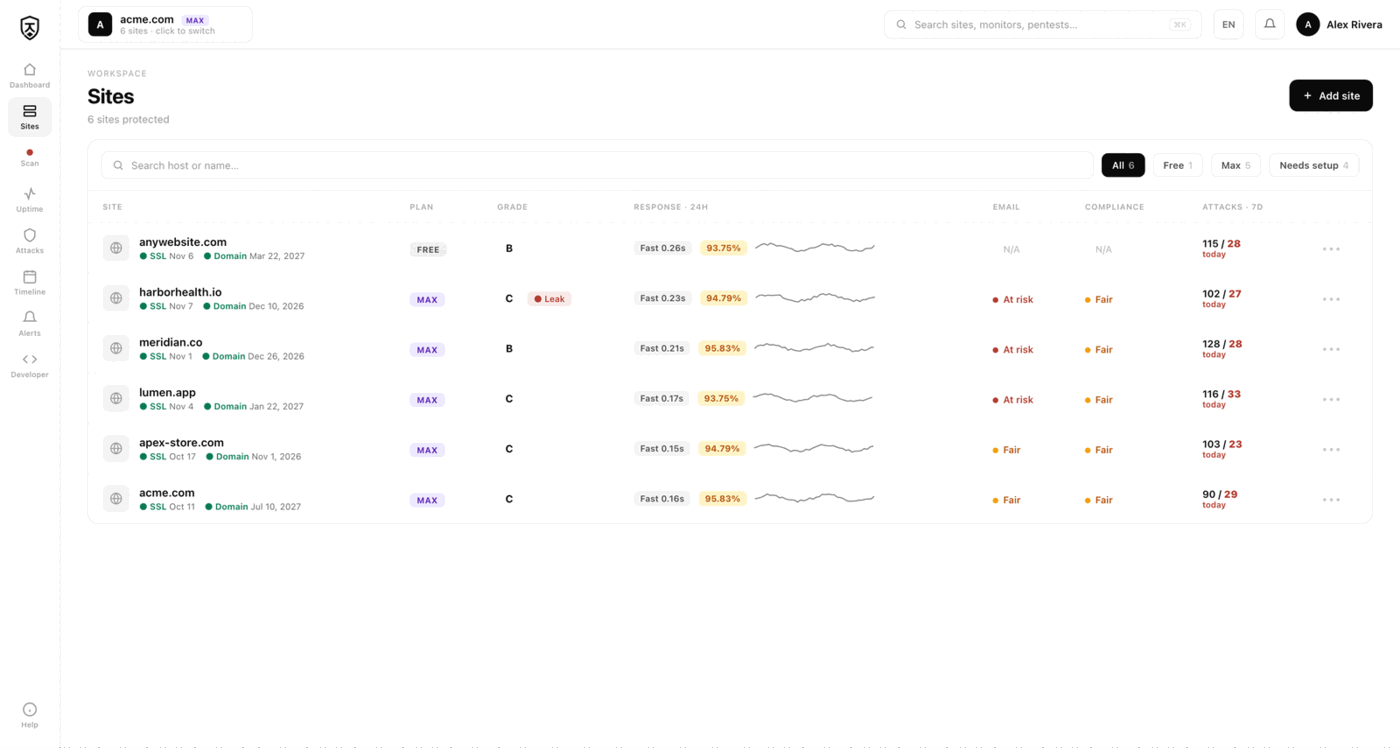
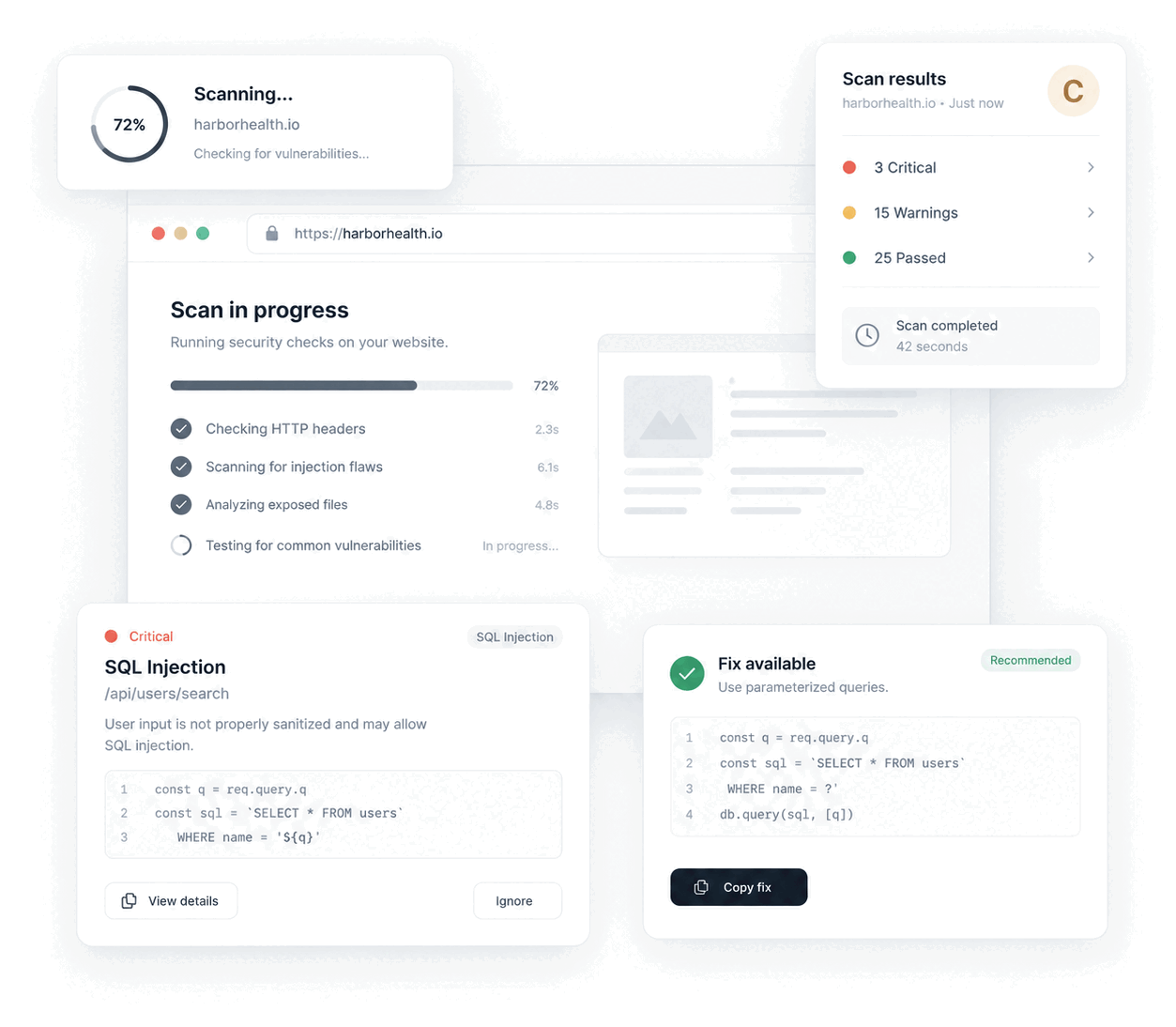
Jikida covers a wider job at a developer price. It runs a live-app pentest and gives one fix per finding. It also scans your code repository for leaked secrets, dangerous code, and vulnerable dependencies through OSV and a malicious-package feed. On top of that it runs a managed WAF, uptime checks, and SSL and domain expiry alerts. This is the common shape of the query "Acunetix alternative for solo developers" and "DAST for indie devs": people want the scan, but also the defense and the monitoring, in one account.
If you need a heavy scan engine tuned by a full security team, Acunetix fits. If you build the app and want scan, fix, block, and watch together, look at Jikida's pentest tooling and its free tier.
Switching from Acunetix to Jikida.
Jikida adds three things Acunetix does not aim to cover. First, a repo and code scanner that reads your source for hardcoded secrets, dangerous patterns, and vulnerable dependencies through OSV and a malicious-package feed. DAST tests the running site from outside. Repo scanning catches the risk before it ships.
Second, a managed WAF that blocks attacks in real time, plus uptime, SSL, and domain expiry monitoring with a call-style phone alarm when something breaks. A scanner tells you about a problem. The WAF stops the attack while you fix it.
Third, developer-native tools. Jikida runs as MCP tools inside Claude Code, Cursor, and Windsurf, and as a CLI (npx @jikida/scan) that outputs SARIF with --fail-on for CI gates. Install is one line and every layer fails open, so a Jikida outage never takes your site down.
There is nothing to migrate. You can run Jikida beside Acunetix or any existing scanner. Point it at your live URL and your repo, read the graded report, and turn on the WAF and monitors you want. The free tier needs no card: one pentest, one repo scan, uptime, basic WAF, and MCP access.
Compare Jikida with the rest.
How to switch from Acunetix without a monitoring gap.
Migrating off Acunetix is a five-minute job, not a project. You keep Acunetix live while you set Jikida up, move your sites and alerts across, switch on the WAF and pentest Acunetix never offered, and only then cancel. Here is the exact order.
-
01
Keep Acunetix running while you set up
No rip-and-replace. Create a free Jikida account and add your sites there first, and Acunetix stays live the whole time, so there is never a monitoring gap during the move.
-
02
Add your sites and endpoints
Point Jikida at the same URLs, domains and API endpoints you watch in Acunetix. Uptime checks, SSL and domain-expiry monitoring and a public status page turn on the moment a site is added: no agent to install, no DNS change.
-
03
Wire up the alerts you already use
Connect email, Slack, Discord, Telegram or a signed webhook, and install the Jikida Alerts phone app. The call-style Alarm level rings through silent mode and Do Not Disturb for the 3am outage you cannot sleep through, something Acunetix cannot do.
-
04
Turn on the security Acunetix does not have
This is the real upgrade: a managed WAF in one SDK line, a scheduled pentest that grades your site A–F, repo and secret scanning, and active deception, all in the same account, at no extra vendor. Monitoring and security stop being two bills.
-
05
Run both for a cycle, then cancel Acunetix
Watch the two side by side for a billing cycle. Once you trust the Jikida alerts and grades, cancel Acunetix and consolidate. Most teams find they were paying for uptime and still had no security layer at all.
Frequently asked questions.
Everything people ask before they switch from Acunetix. Still unsure? We are one message away.
Yes, for most solo and small-team needs. Acunetix is built and priced for dedicated security teams. Jikida gives a graded live-app pentest, repo and dependency scanning, a managed WAF, and uptime monitoring in one developer-priced account. It also has a free tier with no card, so you can test it on your own app first.
Jikida is priced for individual developers and small teams, not enterprise security departments. It starts with a free tier: one pentest, one repo scan, uptime, basic WAF, and MCP tools, no card required. Paid plans add more scans and monitors. Acunetix does not publish public pricing, so compare on your own budget.
Yes. Jikida runs a live-app pentest against your running site and grades it. It checks security headers, TLS, exposed .env, .git and log files, client secrets, open ports, admin panels, CORS, reflected XSS, subdomain takeover, GraphQL introspection, and HTTP methods. Each finding comes with one clear fix. Acunetix is a deeper, team-tuned scan engine for large surfaces.
Jikida adds a repo and code scanner for secrets, dangerous code, and vulnerable dependencies through OSV, plus a managed WAF that blocks attacks, uptime and SSL and domain monitoring, a call-style phone alarm, and MCP tools in Claude Code, Cursor, and Windsurf. Acunetix focuses on DAST scanning. Jikida combines scan, fix, block, and watch in one account.
Yes. The free plan needs no card. You get one live-app pentest, one repo scan, uptime monitoring, a basic managed WAF, and MCP tools. It is a real way to grade your app and find leaked secrets before you pay for anything. Paid plans add more scans, more monitors, and higher limits.
Yes. There is nothing to migrate. Jikida reads your live URL and your repo independently, so you can run it beside Acunetix or any current scanner. Many teams keep an enterprise DAST for deep scans and add Jikida for repo scanning, the managed WAF, uptime alerts, and the developer CLI and MCP tools.
One platform · One install
Pentest, scan and protect from one account.
A live-app pentest, repo and secret scanning, a managed firewall and monitoring — free to start, no card. Plans from $15/mo.