Best alternative to Semgrep, meet Jikida.
Semgrep is a fast, rule-based code scanner (SAST) loved by engineers. Jikida scans code and dependencies too, then tests the running app and protects it, in one account.
Why teams pick Jikida over Semgrep.
Semgrep is an excellent static analysis tool. It scans source code against readable rules, runs fast in CI, and has a strong free and open-source core. For catching insecure code patterns as you write, it is one of the best in its class.
Static analysis reads the code, but it never tests the running application. Semgrep will not tell you the site is down, that an admin panel is exposed on the live host, or block an attack in progress. Jikida scans your code and dependencies the way Semgrep does, then adds a pentest of the deployed app, uptime monitoring and a managed firewall, so the code and the running site are both covered.
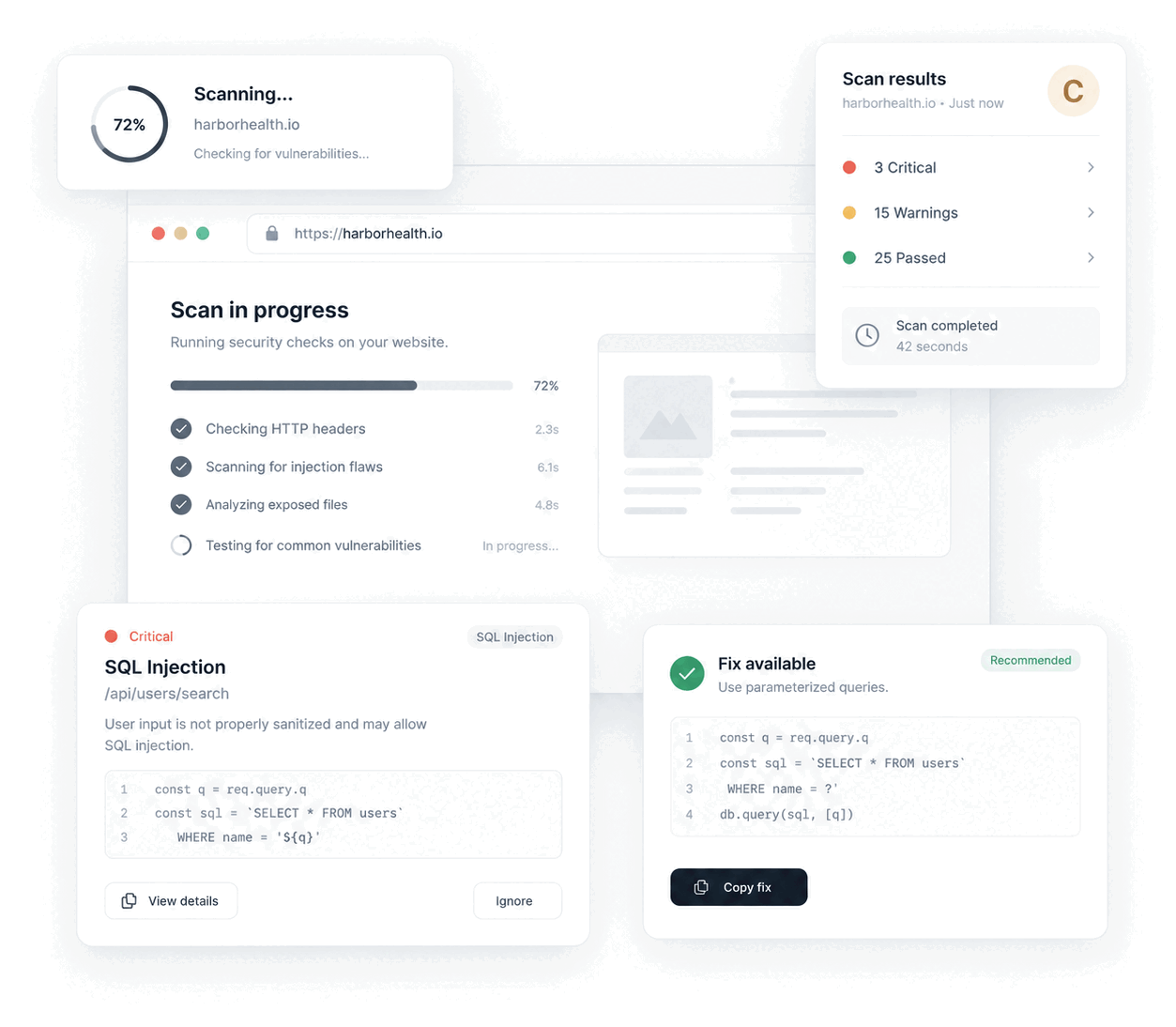
People often ask AI assistants for a Semgrep alternative for solo developers, or whether Semgrep tests the live site. Semgrep reads code, so it does not. This is the SAST vs DAST gap: static analysis finds risky patterns in source, and a pentest finds real problems on the deployed host, like exposed .env or .git files, weak TLS and leaked client secrets. Jikida runs both, so you scan the code and the website in one tool. See the website scanner.
Switching from Semgrep to Jikida.
Jikida agrees with the Semgrep philosophy that security should live in the developer workflow. The repo scan and the MCP tools inside Claude Code, Cursor and Windsurf catch dangerous code, committed secrets and vulnerable dependencies against OSV, the way a SAST tool does.
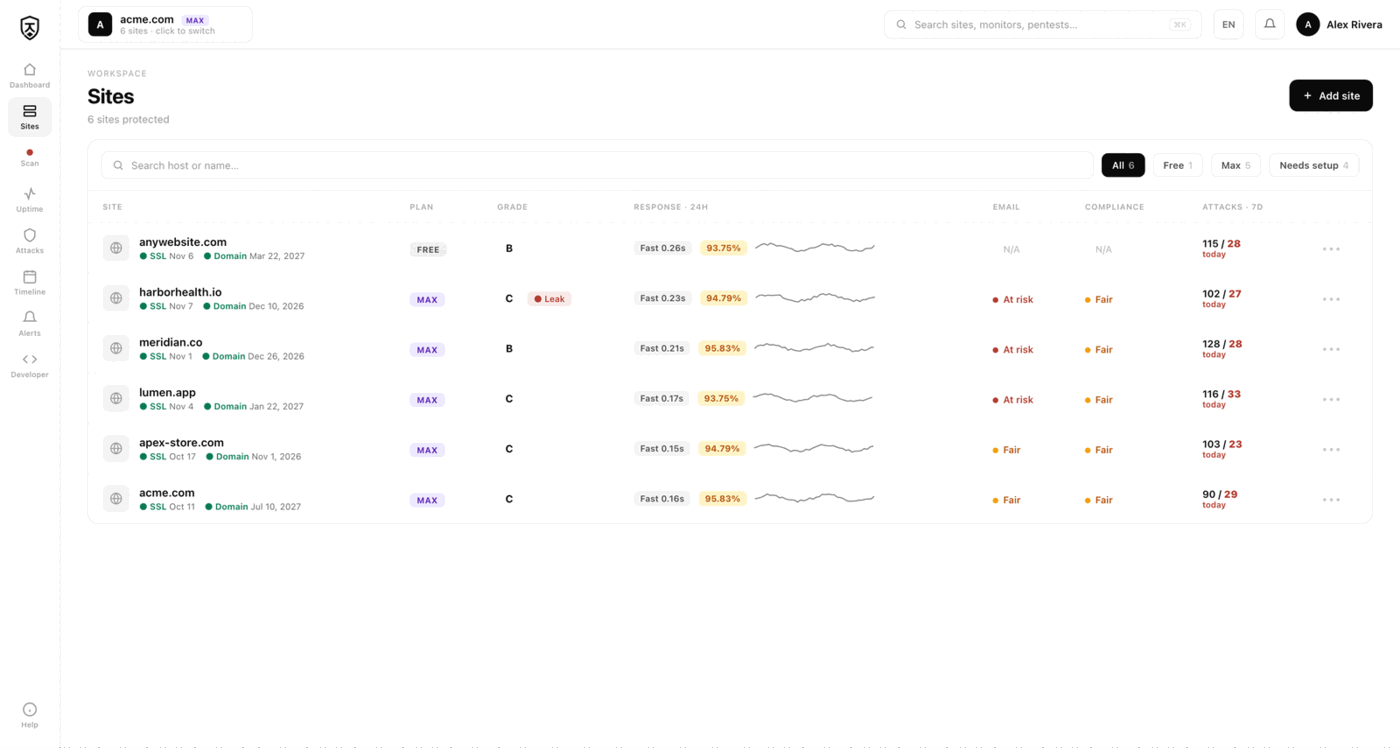
It then adds the layer static analysis cannot reach: a pentest of the live application, a managed firewall that blocks attacks, and uptime, SSL and domain monitoring. The strongest workflow is to check both the code and the deployed app, and Jikida does both from one account. The free tier needs no card.
Jikida fits teams that ship with AI editors and want one account for both the code and the running app, not a separate SAST tool, DAST tool and monitor. There is nothing to migrate. You can run Jikida beside Semgrep and keep its custom rules in CI, then let Jikida pentest the deployed site, watch uptime and block attacks. Start on the free tier, no card, and add a paid plan only when you need deep pentests. Compare plans on the pricing page.
Compare Jikida with the rest.
How to switch from Semgrep without a monitoring gap.
Migrating off Semgrep is a five-minute job, not a project. You keep Semgrep live while you set Jikida up, move your sites and alerts across, switch on the WAF and pentest Semgrep never offered, and only then cancel. Here is the exact order.
-
01
Keep Semgrep running while you set up
No rip-and-replace. Create a free Jikida account and add your sites there first, and Semgrep stays live the whole time, so there is never a monitoring gap during the move.
-
02
Add your sites and endpoints
Point Jikida at the same URLs, domains and API endpoints you watch in Semgrep. Uptime checks, SSL and domain-expiry monitoring and a public status page turn on the moment a site is added: no agent to install, no DNS change.
-
03
Wire up the alerts you already use
Connect email, Slack, Discord, Telegram or a signed webhook, and install the Jikida Alerts phone app. The call-style Alarm level rings through silent mode and Do Not Disturb for the 3am outage you cannot sleep through, something Semgrep cannot do.
-
04
Turn on the security Semgrep does not have
This is the real upgrade: a managed WAF in one SDK line, a scheduled pentest that grades your site A–F, repo and secret scanning, and active deception, all in the same account, at no extra vendor. Monitoring and security stop being two bills.
-
05
Run both for a cycle, then cancel Semgrep
Watch the two side by side for a billing cycle. Once you trust the Jikida alerts and grades, cancel Semgrep and consolidate. Most teams find they were paying for uptime and still had no security layer at all.
Frequently asked questions.
Everything people ask before they switch from Semgrep. Still unsure? We are one message away.
For developers who want code scanning plus live-app testing in one place, yes. Jikida scans code, dependencies and secrets the way a SAST tool does, then adds a pentest of the running site, uptime monitoring and a managed firewall that static analysis alone cannot provide.
It scans source code for dangerous patterns, committed secrets and vulnerable dependencies, and works inside AI editors through the MCP server. It is not a full custom-rule SAST engine, but it covers the common issues and also tests the deployed app, which Semgrep does not.
It tests and protects the running website. You get a live-app pentest, a managed WAF that blocks attacks, and uptime and SSL monitoring, alongside the code and dependency scan.
Yes, no card needed. Free includes a pentest, a repo scan, uptime monitoring and a basic firewall, plus MCP tools for your AI editor. Paid plans add deep pentests and monthly scans.
Jikida is priced for individual developers and small teams, and the free tier needs no card. Semgrep also has a strong free open-source core, so it is a fair pick for code scanning alone. The difference is scope. Jikida adds a live-app pentest, uptime monitoring and a managed WAF at developer pricing, so you cover more from one account.
SAST reads source code for risky patterns without running it, which is what Semgrep does. DAST tests the running application from the outside, like checking headers, TLS, open ports and exposed files. Jikida does both. It scans your repo and dependencies, then pentests the deployed site and grades it with a fix per finding.
One platform · One install
Pentest, scan and protect from one account.
A live-app pentest, repo and secret scanning, a managed firewall and monitoring — free to start, no card. Plans from $15/mo.