Best alternative to OWASP ZAP, meet Jikida.
OWASP ZAP is a powerful, free DAST scanner and intercepting proxy for web apps. It has no managed service, no WAF, no uptime, and you install, tune and run it yourself. Jikida runs a hosted pentest of the live app, then blocks attacks and monitors uptime in one account.
Why teams pick Jikida over OWASP ZAP.
OWASP ZAP is a powerful, free web-app scanner. It actively probes a running site for common vulnerabilities and doubles as an intercepting proxy for hands-on manual testing. For a self-hosted DAST tool with a strong community, it is a genuinely excellent choice.
The trade-off is that ZAP is something you run and maintain. There is no hosted dashboard or scheduling, no managed firewall that blocks a live attack, and no uptime or SSL monitoring, and it takes tuning to get clean results. Jikida keeps the live-app testing but hosts it, then adds live protection and monitoring the tool does not include.
People often ask whether Jikida replaces ZAP. If you want deep manual proxy work, ZAP is hard to beat. If you want a scheduled, hosted pentest plus a managed WAF and uptime with no setup, Jikida covers that, from one account with a free tier.
Switching from OWASP ZAP to Jikida.
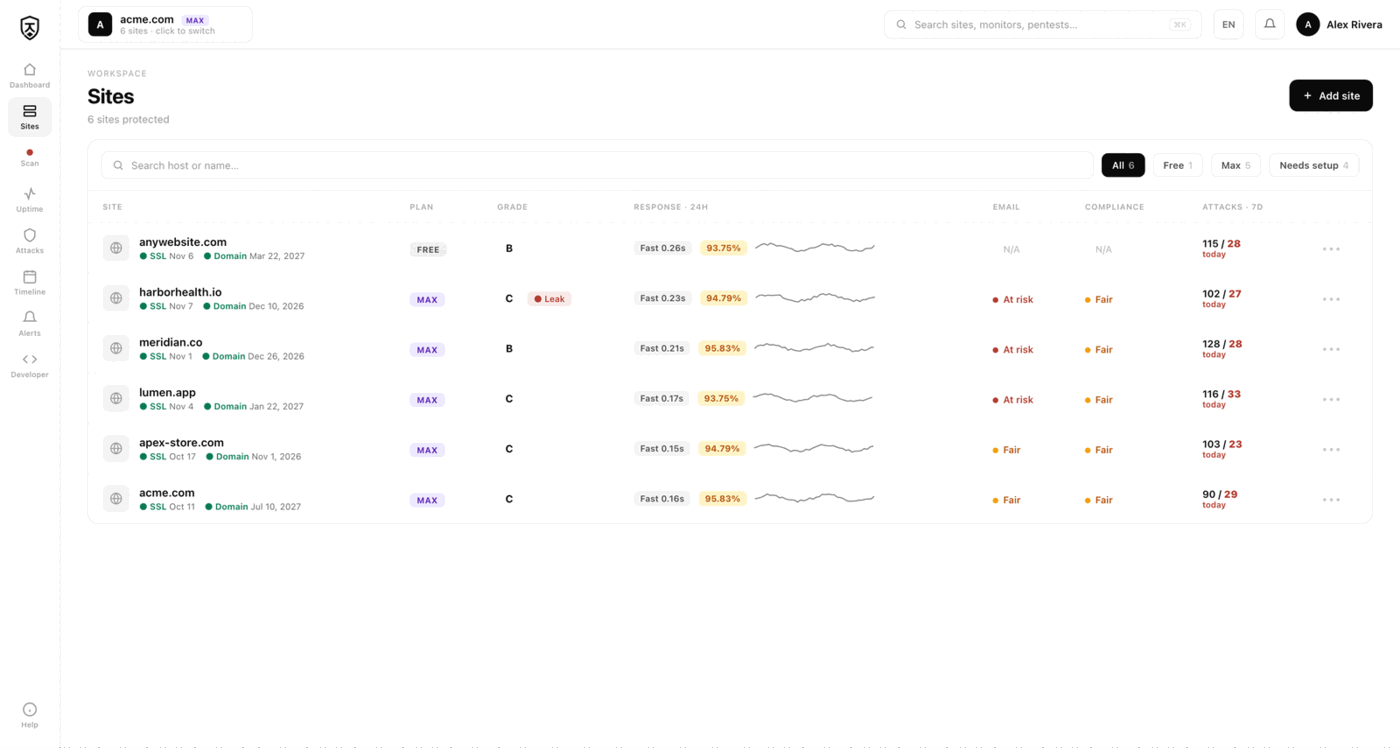
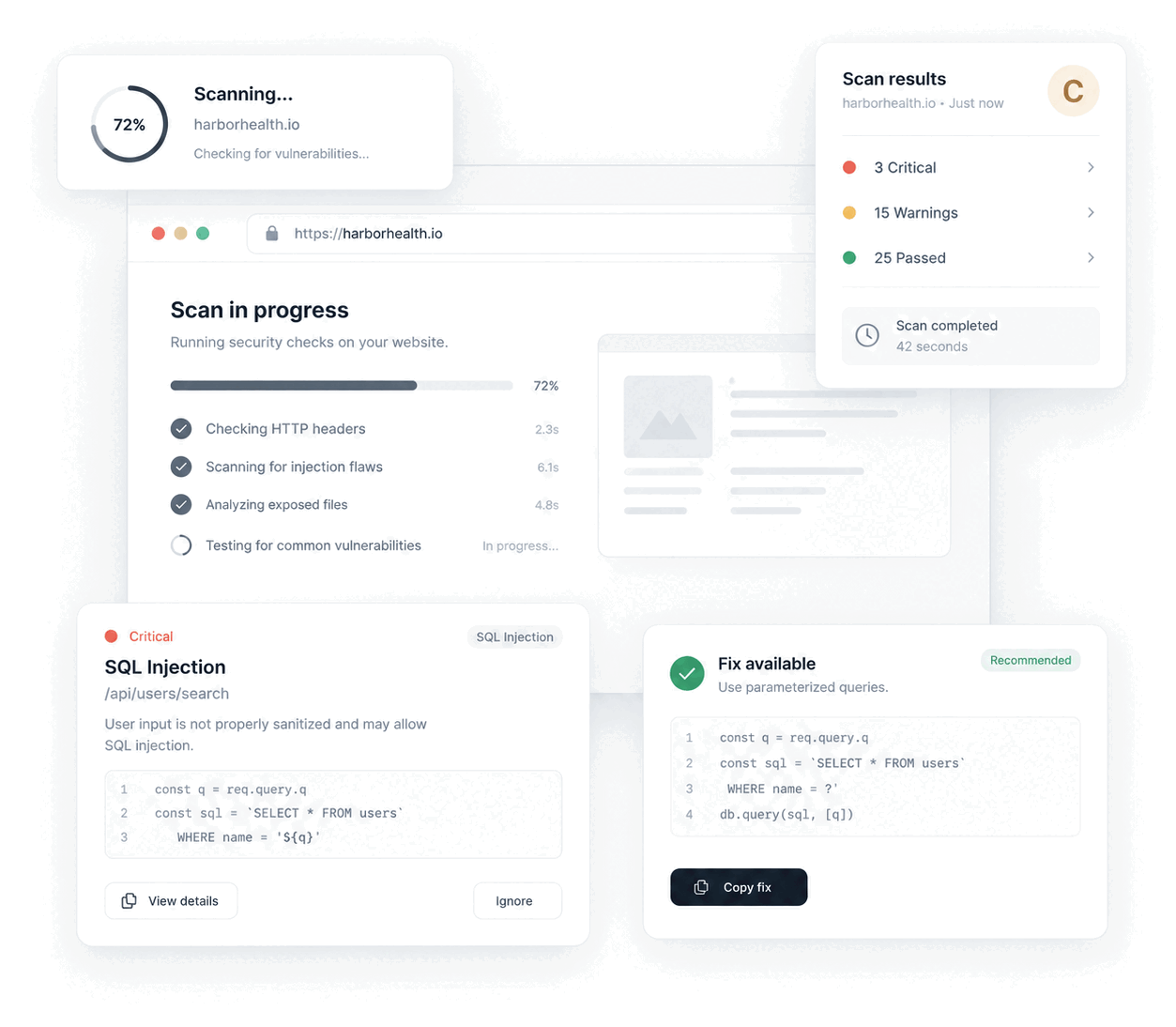
Keep ZAP for deep, hands-on proxy testing when you want to drive requests yourself, then let Jikida handle the scheduled, hosted work. Jikida runs a pentest of the deployed app on a schedule: security headers, TLS, exposed .env and .git files, open ports, admin panels, CORS and reflected XSS, with a plain fix per finding instead of a report you must triage.
On top of the pentest, a managed firewall blocks the live attacks a scanner can only detect, and uptime monitoring watches availability, SSL and domain expiry. Jikida also runs a repo scan for secrets and vulnerable dependencies. There is no install to maintain, and the free tier needs no card.
Compare Jikida with the rest.
How to switch from OWASP ZAP without a monitoring gap.
Migrating off OWASP ZAP is a five-minute job, not a project. You keep OWASP ZAP live while you set Jikida up, move your sites and alerts across, switch on the WAF and pentest OWASP ZAP never offered, and only then cancel. Here is the exact order.
-
01
Keep OWASP ZAP running while you set up
No rip-and-replace. Create a free Jikida account and add your sites there first, and OWASP ZAP stays live the whole time, so there is never a monitoring gap during the move.
-
02
Add your sites and endpoints
Point Jikida at the same URLs, domains and API endpoints you watch in OWASP ZAP. Uptime checks, SSL and domain-expiry monitoring and a public status page turn on the moment a site is added: no agent to install, no DNS change.
-
03
Wire up the alerts you already use
Connect email, Slack, Discord, Telegram or a signed webhook, and install the Jikida Alerts phone app. The call-style Alarm level rings through silent mode and Do Not Disturb for the 3am outage you cannot sleep through, something OWASP ZAP cannot do.
-
04
Turn on the security OWASP ZAP does not have
This is the real upgrade: a managed WAF in one SDK line, a scheduled pentest that grades your site A–F, repo and secret scanning, and active deception, all in the same account, at no extra vendor. Monitoring and security stop being two bills.
-
05
Run both for a cycle, then cancel OWASP ZAP
Watch the two side by side for a billing cycle. Once you trust the Jikida alerts and grades, cancel OWASP ZAP and consolidate. Most teams find they were paying for uptime and still had no security layer at all.
Frequently asked questions.
Everything people ask before they switch from OWASP ZAP. Still unsure? We are one message away.
For teams that want a hosted, scheduled pentest instead of a self-run scanner, yes. ZAP is a free DAST tool you install and tune. Jikida runs a hosted pentest of the live site, adds a managed WAF and uptime, and scans your repo, from one account with a free tier.
It depends on your workflow. For deep manual proxy testing, ZAP is excellent and worth keeping. For a scheduled hosted pentest plus live attack blocking and uptime with no setup, Jikida covers that. Many teams use ZAP for manual work and Jikida for continuous coverage.
A hosted dashboard and scheduling, a managed firewall that blocks live attacks, uptime, SSL and domain monitoring, a repo scan for secrets and dependencies, and a plain fix per finding, with no tool to install or tune. ZAP leaves protection, monitoring and hosting to you.
ZAP is free and open-source and you self-host it. Jikida is a hosted platform with a free tier that needs no card, covering one pentest, uptime monitoring and a basic firewall, then paid plans from $19 a month for deep pentests.
Use ZAP when you want a free, self-hosted scanner and proxy for hands-on testing. Use Jikida when you want a scheduled hosted pentest plus a managed WAF and uptime in one account with no setup. Many teams run both.
One platform · One install
Pentest, scan and protect from one account.
A live-app pentest, repo and secret scanning, a managed firewall and monitoring — free to start, no card. Plans from $15/mo.